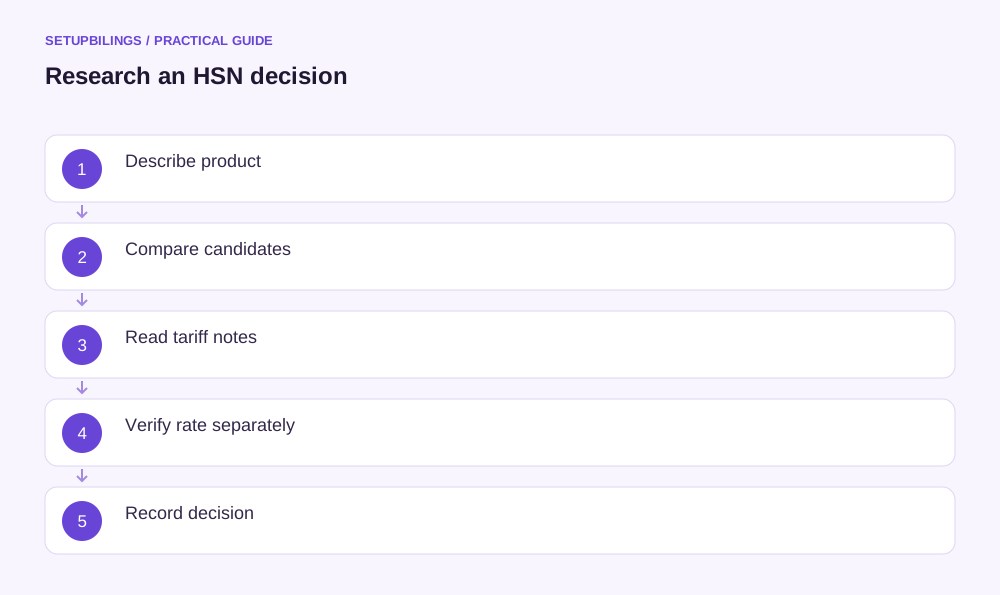
Research a new product's HSN classification by assembling its technical facts, identifying candidate tariff headings and testing those candidates against the relevant descriptions and notes. A keyword result or supplier invoice can provide a lead, but it should not be the entire reasoning. CBIC explains that the Customs Tariff's heading, subheading and tariff-item structure is used for GST classification of goods. The current GST rate then requires its own notification check.
Describe the product before searching for a code
Prepare a factual product sheet: material composition, function, manufacturing process, physical form, dimensions, packaging, intended use and how it is supplied. Attach photographs, specifications and catalogue information. For a composite material, obtain the composition rather than describing it only as “premium” or “industrial.” Marketing names rarely provide the distinctions a tariff description needs.
Ask whether the product is complete, unfinished, a component, an accessory or a set. Record how it works independently and with other equipment. If the supplier offers several variants under the same brand, identify the variant being classified. A product family code can become unreliable when a new model changes material, function or supply form.
Create a shortlist instead of accepting the first match
Search the official tariff and relevant GST resources using technical terms as well as the commercial description. Start broadly, then compare the candidate headings. Read the surrounding entries: a close-looking search result may belong to a category excluded by a Section or Chapter Note.
Chennai Customs' official procedure describes classification as requiring regard to the tariff's Rules of Interpretation and Section and Chapter Notes. That is a useful research discipline for an MSME as well. Record the exact description and note considered; “found online” does not explain why a heading covers your product.
Test the decisive characteristics
Build a small comparison table that captures why one candidate appears stronger. Avoid adding unsupported legal conclusions to a purely commercial product sheet. Where a question turns on a technical feature, obtain an engineer's or manufacturer's factual explanation rather than asking accounts staff to infer it from a photograph.
| Research question | Evidence to collect |
|---|---|
| What material gives the product its relevant character? | Composition certificate or specification |
| What does it actually do? | Operating manual and functional description |
| How is it supplied? | Packing list, photographs and sales contract |
| Is a candidate entry excluded? | Relevant tariff note and recorded reasoning |
These records help a reviewer challenge the choice before it becomes the default on hundreds of invoices.
Use supplier documents as evidence, not an automatic answer
A manufacturer's invoice or an import bill of entry may contain a useful code. Compare the documented product with your own SKU. The supplier may sell a different grade, a larger assembly or a separately packaged component. Its code may also reflect an older classification decision that nobody has revisited.
If two suppliers quote different codes, do not choose whichever has the lower tax rate. Ask for the underlying descriptions and classification basis. Keep both candidates in the research file and explain the resolved difference. Where the evidence remains incomplete, hold the master approval until the specific missing technical fact is obtained.
Separate code selection from rate selection
After identifying the classification, read the applicable GST rate entry, amendments and conditions for the transaction date. A code can appear in more than one context, and description-based conditions may matter. A search tool's displayed rate should be checked against the actual notification rather than stored as timeless truth.
Use an illustrative sensitivity calculation to show why the review matters: on taxable sales of ₹2,00,000, assumed rates of 5% and 18% would produce ₹10,000 and ₹36,000 tax respectively. The ₹26,000 difference is not an invitation to select a rate. It shows why an unresolved code or conditional description should not be treated as a harmless data-entry detail.
Check the invoice code depth separately
CBIC's HSN guidance distinguishes four-digit headings, six-digit subheadings and eight-digit tariff items. The number of digits required on an invoice depends on the applicable notification and taxpayer facts. The invoice disclosure requirement does not remove the need to understand the full classification when determining the product's treatment.
Keep the researched code as text so leading zeros remain intact. Store the approved description, effective date and reference alongside it. If billing uses a shorter permitted code, retain a clear relationship between that displayed value and the more detailed internal classification record. Avoid manually truncating codes in an uncontrolled spreadsheet.
If the proposed code remains disputed internally, identify the exact unresolved feature rather than recording “HSN pending.” A question such as whether the supplied item functions independently gives the technical team a concrete task. Keep the stock item unavailable for routine live billing until the agreed review resolves that fact and approves the treatment.
Write a reviewable decision note
The note can be brief: product identified, facts relied on, candidate entries considered, relevant notes, selected classification, separate rate reference and unresolved assumptions. Date it and identify the person responsible for updating the item master. A classification decision without its assumptions becomes difficult to reassess when the product changes.
Review the file when a supplier changes composition, the business bundles the product differently or an official amendment affects the relevant entries. Preserve the old version for earlier transactions. HSN research is complete when another reviewer can understand why the code was chosen and which facts would change that conclusion, not merely when a number has been entered into the billing screen.